Integration Portal
PaymentForm
"The focus is on merchants, the priority is their profitability, the goal is innovation and pragmatism."
PaymentForm is the hosted payment form by PROCASH. Your site never sees card data: the form is served from a PCI-compliant domain. You only execute two server-to-server calls from your backend: OrderInitial to create the order and OrderFinal to confirm the result.
Only 2 S2S calls
OrderInitial to create the order, OrderFinal to confirm the result. Everything else is automatic.
PCI SAQ-A included
Your server never sees or processes card data. The PCI scope is minimal by design.
2 integration modes
Full redirect (simpler) or embedded iframe with postMessage for an experience without leaving your site.
Installments and QR
Native support for installments (1 to N) with configurable financial plans per acquirer. Dynamic QR payments available depending on the platform configuration.
Argentine context
Currency ARS (032) · Amounts in cents · CUIT/CUIL as tax identifier · Time zone UTC-3 (Buenos Aires).
How it works
Complete sequence diagram: actors, calls, and data flow.
Integration modes
PaymentForm supports three modes depending on the level of UX control and integration you need. All three maintain PCI SAQ-A compliance — the merchant never captures card data.
Mode A — Redirect
The buyer's browser leaves your site and goes to the hosted form. The simplest and fastest integration mode.
✓ PCI SAQ-A EasiestMode B — Embedded (full iframe)
The complete form is displayed in a cross-origin iframe within your page. Communication via postMessage.
✓ PCI SAQ-A Better UXMode C — Hosted Fields
Only the card fields (PAN + CVV) go into a PROCASH iframe. The merchant builds the rest of the form — maximum layout control, without touching CHD.
✓ PCI SAQ-A Maximum control Designed · implementingYou redirect the buyer using the CustomerRedirectAddress returned by OrderInitial. The form processes the payment and returns the buyer to your MerchantRedirectURL.
// 1. Call OrderInitial from your server
const response = await fetch('https://api.procash.dev/OrderInitial', {
  method: 'POST',
  headers: {
    'Content-Type': 'application/json',
    'Authorization': `Bearer ${API_KEY}`
  },
  body: JSON.stringify({
    OrderInitial: {
      MerchantSystemID: 'SHOP-01',      // required
      MerchantCompanyID: '0',          // required
      TransactionAmount: 1000000,      // $10,000.00 ARS (in cents)
      CurrencyCode: '032',            // desirable — if omitted assumes ARS
      ReferenceNumber: 'ORD-2026-0001',
      MerchantRedirectURL: 'https://www.mi-tienda.com.ar/pago/retorno', // optional
      MerchantNotifyURL: 'https://www.mi-tienda.com.ar/webhooks/pago',   // recommended
      FacilityNumber: 3,              // optional — cuotas (1 = contado)
    }
  })
});
const { OrderInitialResponse: r } = await response.json();

// 2. Verify that the order was created successfully
//    ResponseActions is the source of truth — must contain "OK"
//    ResponseCode "-1" is the success indicator in this contract
if (!r.ResponseActions?.includes('OK') || r.ResponseCode !== '-1') {
  // Order rejected by the platform — do not redirect
  throw new Error(`OrderInitial failed: [${r.ResponseActions}] ${r.ResponseMessage}`);
}

// 3. Validate presence of required fields in the response
if (!r.InitialIdentification || !r.CustomerRedirectAddress) {
  throw new Error('Incomplete response: missing InitialIdentification or CustomerRedirectAddress');
}

// 4. ⚠️ Save InitialIdentification in your DB BEFORE redirecting
//    It is PRIVATE — it never travels to the browser
await db.orders.update({ referenceNumber: 'ORD-2026-0001' }, {
  initialIdentification: r.InitialIdentification
});

// 5. Redirect the buyer to the form — only the InitialToken (PUBLIC) travels in the URL
res.redirect(302, r.CustomerRedirectAddress);
Embed the form in your page with an iframe using the same URL. Listen to postMessage events — card data never leaves the iframe.
paymentform:ready · paymentform:resize · paymentform:submitted · paymentform:error
<!-- iframe cross-origin — PCI SAQ-A maintained -->
<iframe
  id="payment-frame"
  src="https://payment.procash.dev/?token=INITIAL_TOKEN_AQUI"
  style="width:100%;border:none;min-height:420px;"
  allow="payment"
></iframe>

<script>
window.addEventListener('message', (e) => {
  // Always verify origin
  if (e.origin !== 'https://payment.procash.dev') return;

  const { type, result } = e.data;

  if (type === 'paymentform:submitted') {
    if (result === 'approved') {
      // Call your backend to execute OrderFinal
      confirmOrder(result);
    } else if (result === 'refused') {
      showRefusedMessage();
    }
  }

  if (type === 'paymentform:resize') {
    document.getElementById('payment-frame').style.height = e.data.height + 'px';
  }
});
</script>embed-fields.ts) is implemented. The cross-origin subdomain infrastructure and WASM→JWE encryption are pending. Consult the PROCASH team for availability in sandbox.¿Qué es Hosted Fields?
Instead of embedding the complete form, only the sensitive fields (PAN + CVV) are in a cross-origin iframe served by PROCASH. Your page builds the rest of the checkout — amount, installments, buyer details, layout — while card data never touches your DOM.
Tiers de hosting disponibles
| Tier | Iframe domain | Who is it for |
|---|---|---|
| T1 — Compartido | {tenant}.payment.procash.dev | Default — quick onboarding |
| T2 — White-label | pay.tudominio.com (CNAME → PROCASH) | Merchants with their own branding |
| T3 — Enterprise | Dominio completamente custom | Banks / large retailers (regional/on-prem hosting) |
Contrato postMessage (eventos del iframe)
| Event | Direction | Payload |
|---|---|---|
paymentform:ready | iframe → parent | { mode: 'fields' } — iframe ready to receive interaction |
paymentform:fieldValidity | iframe → parent | { field: 'pan'|'cvv', valid: bool } — to enable/disable the button |
paymentform:resize | iframe → parent | { height: px } — adjust iframe height |
paymentform:submit | parent → iframe | { token } — submit trigger from your button |
paymentform:submitted | iframe → parent | { result: 'approved'|'refused'|'challenge' } |
paymentform:error | iframe → parent | { code, message } |
<!-- Only the sensitive fields iframe (cross-origin) -->
<div id="checkout">
  <!-- Your UI: amount, installments, cardholder name -->
  <p>Total: <strong>$10.000,00 ARS</strong> en 3 cuotas</p>

  <!-- PROCASH iframe: PAN + CVV only -->
  <iframe
    id="fields-frame"
    src="https://{tenant}.payment.procash.dev/fields?token=INITIAL_TOKEN"
    style="width:100%;border:none;height:120px;"
    allow="payment"
    sandbox="allow-scripts allow-same-origin"
  ></iframe>

  <!-- Your own payment button -->
  <input type="text" placeholder="Cardholder name" id="cardName">
  <button id="pay-btn" disabled>Pay</button>
</div>

<script>
const frame = document.getElementById('fields-frame');
const payBtn = document.getElementById('pay-btn');
let panOk = false, cvvOk = false;

// Listen to iframe events
window.addEventListener('message', (e) => {
  if (e.origin !== 'https://{tenant}.payment.procash.dev') return;
  const { type, field, valid, height, result } = e.data;

  if (type === 'paymentform:resize')
    frame.style.height = height + 'px';

  if (type === 'paymentform:fieldValidity') {
    if (field === 'pan') panOk = valid;
    if (field === 'cvv') cvvOk = valid;
    payBtn.disabled = !(panOk && cvvOk);  // enable only if both OK
  }

  if (type === 'paymentform:submitted' && result === 'approved')
    confirmOrder();  // call your backend → OrderFinal
});

// Your button triggers the submit in the iframe
payBtn.addEventListener('click', () => {
  frame.contentWindow.postMessage(
    { type: 'paymentform:submit' },
    'https://{tenant}.payment.procash.dev'
  );
});
</script>sandbox and allow-same-origin are configured by the platform so that postMessage communication works without exposing the sensitive DOM.Step by step
Follow these steps to integrate PaymentForm in your backend.
OrderInitial (S2S)
Call from your server to create the payment order. Never from the browser.
Auth: Authorization: Bearer {API_KEY}
{
  "OrderInitial": {
    "MerchantSystemID": "SHOP-01",       // required
    "MerchantCompanyID": "0",           // required
    "TransactionAmount": 1000000,       // $10,000.00 ARS (in cents)
    "CurrencyCode": "032",              // desirable — if omitted assumes ARS
    "ReferenceNumber": "ORD-2026-0001", // your internal order ID
    "MerchantRedirectURL": "https://www.mi-tienda.com.ar/pago/retorno", // optional
    "MerchantNotifyURL": "https://www.mi-tienda.com.ar/webhooks/pago",   // recommended
    "FacilityNumber": 3,               // optional — cuotas (1 = contado)
    "Products": [
      { "Code": "PLAN-PRO", "Name": "Plan Pro Mensual", "Quantity": 1, "UnitAmount": 1000000 }
    ]
  }
}{
"OrderInitialResponse": {
"ResponseActions": ["OK"], // ← source of truth
"ResponseCode": "-1", // ← informational (-1 = OK in this contract)
"ResponseMessage": "Orden creada", // ← informational
"InitialToken": "11111111-1111-5111-8111-111111111111",
"InitialIdentification": "99999999-9999-5999-8999-999999999999",
"CustomerRedirectAddress": "https://payment.procash.dev/?token=11111111-1111-5111-8111-111111111111",
"MerchantRedirectURL": "https://www.mi-tienda.com.ar/pago/retorno",
"TransactionValidThru": "2026-06-04T23:59:59-03:00", // UTC-3 · Buenos Aires
"Sequence": ""
}
}InitialIdentification in your database associated with the order. It is PRIVATE — never send it to the browser or expose it in URLs.
Redirect the buyer
Use CustomerRedirectAddress (which already has the token embedded). Equivalent to https://payment.procash.dev/?token={InitialToken}
const { OrderInitialResponse: r } = await orderInitial(); // see Step 1

// ✅ Only redirect if ResponseActions contains "OK" and ResponseCode is "-1"
if (r.ResponseActions?.includes('OK') && r.ResponseCode === '-1'
    && r.InitialIdentification && r.CustomerRedirectAddress) {
  res.redirect(302, r.CustomerRedirectAddress);
} else {
  // Handle error — the order was not created
  res.status(400).json({ error: r.ResponseMessage });
}The form processes the payment (internal)
The form manages all payment processing internally — it retrieves the order configuration, captures the buyer's card details, and processes the transaction against the platform. No code is required on your part in this step.
Return to your site
The browser returns to your MerchantRedirectURL. The redirect does not include the payment result — the status is always retrieved using OrderFinal (or OrderStatus) from your server.
https://www.mi-tienda.com.ar/pago/retorno
  ?token=11111111-1111-5111-8111-111111111111
  // ← no status, no result — only the public token
// The actual result is obtained by calling OrderFinal from your serverMerchantNotifyURL) also confirms it asynchronously.
MerchantNotifyURL) and/or OrderStatus to find out the result in your backend.OrderFinal (S2S)
Confirm the result from your server using the InitialIdentification you saved in Step 1.
{
  "OrderFinal": {
    "InitialIdentification": "99999999-9999-5999-8999-999999999999"
  }
}{
"OrderFinalResponse": {
"ResponseActions": ["OK", "Approve", "Tickets", "Completed"], // ← source of truth
// OK → successful operation
// Approve → payment approved
// Tickets → there are receipts to render
// Completed → full cycle: OrderInitial→form→OrderFinal executed
"ResponseCode": "-1", // ← informational (-1 = aprobado)
"ResponseMessage": "Aprobado", // ← informational
"AuthCode": "AUTH123",
"TransactionAmount": 1000000,
"CurrencyCode": "032",
"Tickets": [
{ "Type": "Customer", "Content": "..." },
{ "Type": "Merchant", "Content": "..." }
]
}
}{
"OrderFinalResponse": {
"ResponseActions": ["OK", "Refuse", "Completed"], // ← source of truth — pago NO acreditado
// OK → operation processed
// Refuse → refused by issuer
// Completed → full cycle executed (same as in Approve)
"ResponseCode": "05", // ← informational, solo un ejemplo — puede ser cualquier código
"ResponseMessage": "Tarjeta rechazada por el emisor", // ← informational, solo un ejemplo
"TransactionAmount": 1000000,
"CurrencyCode": "032"
}
}OK → always present along with Approve or Refuse.
Approve → payment approved · confirm and deliver.
Refuse → refused · not charged · notify buyer.
Completed → full cycle: merchant executed OrderFinal and closed integration cycle.
Tickets → there are receipts in Tickets[] to render to buyer.
Do not use ResponseCode or ResponseMessage as decision criteria. Correct logic:
includes('Approve') for approved · includes('Refuse') for refused · includes('Completed') for closed cycle.
📡 Webhook — MerchantNotifyURL
The Core calls your MerchantNotifyURL asynchronously with the payment result. It guarantees that you receive the result even if the browser does not return to your site.
Form Look & Feel
PaymentForm fully adapts to the merchant's branding. Styles, interface model, products, and logo are configured per order, directly in the OrderInitial via AdditionalInformation — without touching form code.
AdditionalInformation[].Name = "PaymentForm.Styles" with the styles JSON in Base64. Merchant branding (name + logo) goes in Name = "PaymentForm.Company". Both are sent in OrderInitial and the form applies them with priority over the base configuration.Modelos de interfaz
Selected with FormMode in the configuration. You can combine any model with any color theme.
Screenshots — the same order in the four combinations
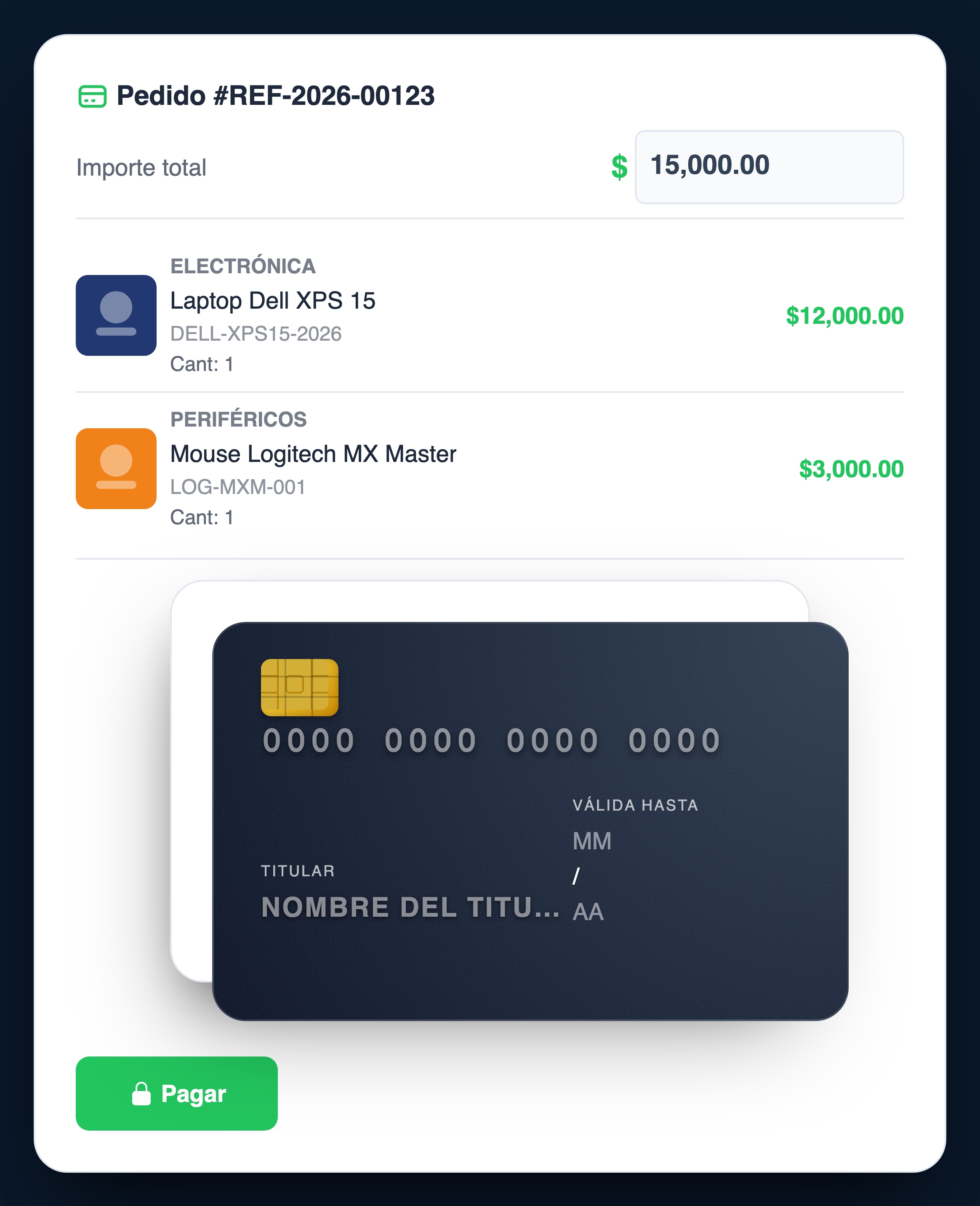
interactive-card · ShowProducts:true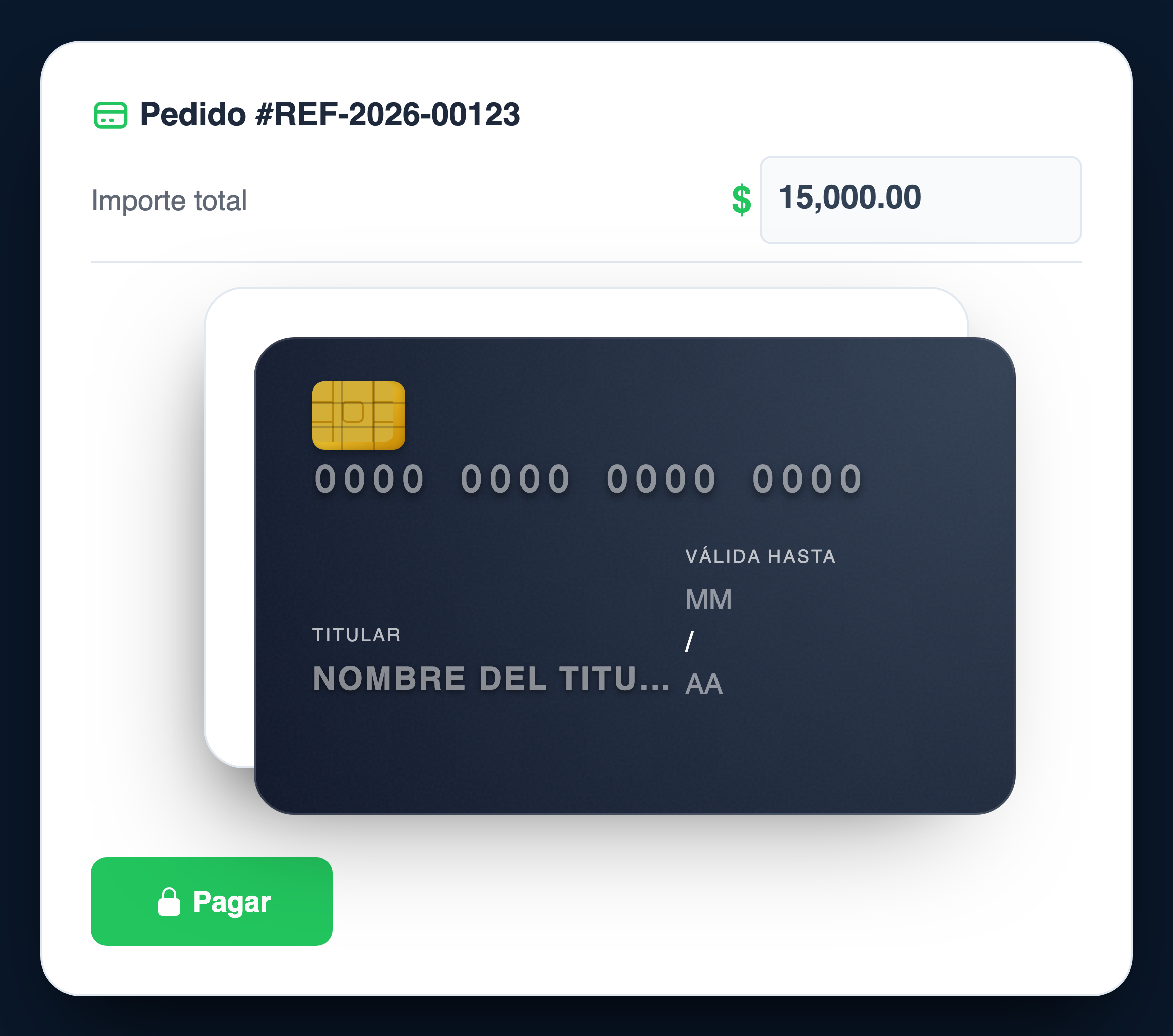
interactive-card · ShowProducts:false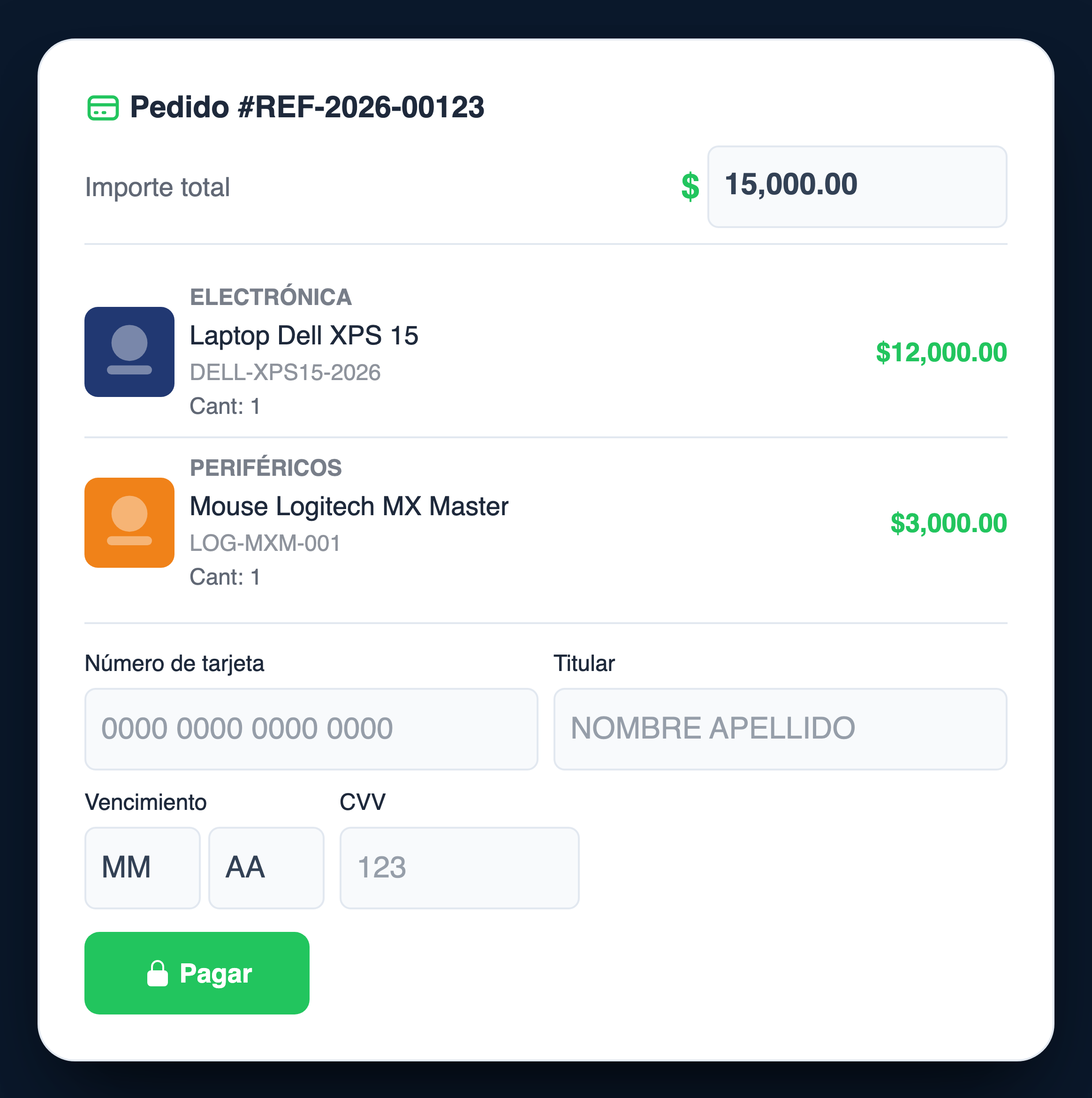
classic · ShowProducts:true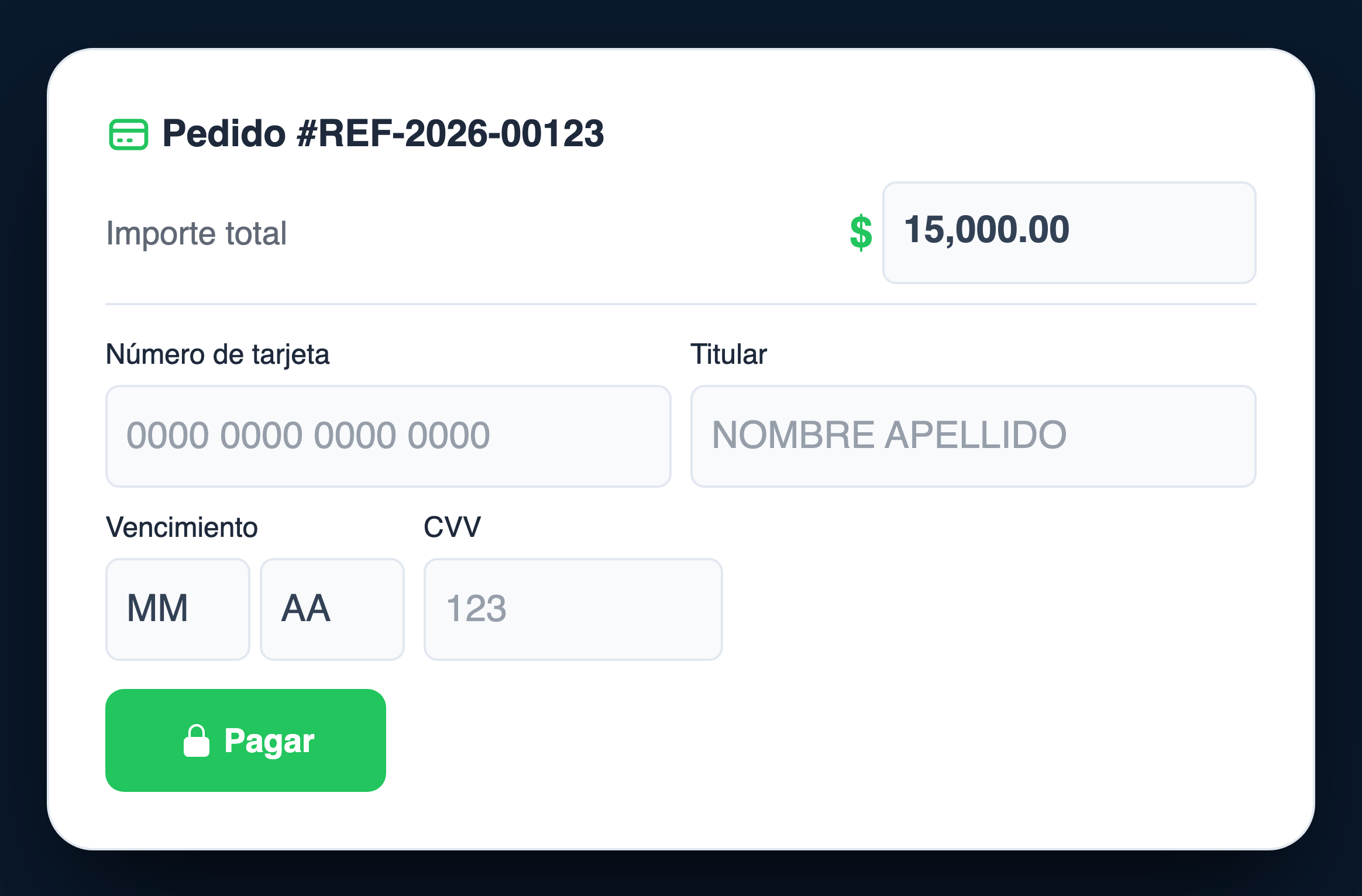
classic · ShowProducts:falseHow to configure styles from OrderInitial
Styles are sent in AdditionalInformation as Base64 JSON. The form applies them with priority over any default configuration.
Background, Text, and Form. Any input or card styling properties must be configured inside these blocks (for example, use Form.input_color instead of a standalone Input object). Legacy root objects like Card or Input are not recognized and will be ignored.// Styles object (flat JSON before encoding)
const stylesArray = [
{ "Background": { "color": "#fcf9fb" } },
{ "Text": { "color": "#130a25" } },
{
"Form": {
"background_color": "#fcf9fb",
"button_color": "#a47fab",
"price_color": "#68ac5c",
"error_color": "#dc2626",
"border_radius": "10px",
"max_width": "520px",
"input_color": "#ffffff",
"input_innertext_color": "#130a25",
"input_border_color": "#f3f3f4",
"form_label": "orden", // "pedido" | "orden" | "operacion" | "transaction"
"show_cft": true,
"show_tea": false,
"show_interest_rate": true,
"show_installment_calculation": false,
"installment_calculation_mode": "simple"
}
}
];
const stylesB64 = btoa(JSON.stringify(stylesArray)); // encode to Base64
// Merchant branding
const companyB64 = btoa(JSON.stringify({
"Name": "Tu Comercio",
"LogoUrl": "https://www.mi-tienda.com.ar/logo.png" // Public URL — requires access from the buyer's browser
// — or —
// "LogoUrl": "data:image/svg+xml;base64,PHN2ZyB4bWxucz0i..." // Data URI — zero external requests (recommended for PCI)
}));
// Real example of Data URI with an SVG icon (64×64, background #004785)
// You can generate yours with: btoa(svgString) in the browser, or base64.b64encode(svg.encode()).decode() in Python
const iconoBase64 = "data:image/svg+xml;base64," +
// PNG: icon + white on background #004785 (32×32 px)
"iVBORw0KGgoAAAANSUhEUgAAACAAAAAgCAIAAAD8GO2jAAAAc0lEQVR42u3WWw4AERQDULuzMuvmW+J1S+sRN36nJ0Zm1LnjxgdCYnsRo3HGFG1m4PQhYzK9Y9SfiaWxG1yguWszUDC4QO/cECAzxEBE51lg7I0jQM34Z7D/OyAA9//snrhwFHeyolUoepGi2Ym66Yp2nQBekRDCxivTugAAAABJRU5ErkJggg==";{
"OrderInitial": {
"MerchantSystemID": "SHOP-01",
"MerchantCompanyID": "0",
"TransactionAmount": 1000000,
"CurrencyCode": "032",
"ReferenceNumber": "ORD-2026-0001",
"Products": [
{
"Code": "PLAN-PRO",
"Name": "Plan Pro Mensual",
"Quantity": 1,
"UnitAmount": 1000000,
"ImageUrl": "data:image/png;base64,iVBORw0KGgoAAAANSUhEUgAAACAAAAAgCAIAAAD8GO2jAAAAc0lEQVR42u3WWw4AERQDULuzMuvmW+J1S+sRN36nJ0Zm1LnjxgdCYnsRo3HGFG1m4PQhYzK9Y9SfiaWxG1yguWszUDC4QO/cECAzxEBE51lg7I0jQM34Z7D/OyAA9//snrhwFHeyolUoepGi2Ym66Yp2nQBekRDCxivTugAAAABJRU5ErkJggg=="
// ↑ Real PNG 32×32 px — icon + white on background #004785 — 172 bytes / 232 chars base64
}
],
"AdditionalInformation": [
{
"Name": "PaymentForm.Styles",
"Value": "<stylesB64>" // result of btoa(JSON.stringify(stylesArray))
},
{
"Name": "PaymentForm.Company",
"Value": "<companyB64>" // result of btoa(JSON.stringify(companyObj))
}
]
}
}Available style tokens
| Token | Object | Description | Example |
|---|---|---|---|
color | Background | Page background color | #fcf9fb · #0f172a |
color | Text | Main card text color | #130a25 · #ffffff |
background_color | Form | Form card background color | #fcf9fb · #ffffff |
button_color | Form | Color of the "Pay" button | #a47fab · #004785 |
price_color | Form | Color of the total amount | #68ac5c · #22c55e |
error_color | Form | Color of validation error messages | #dc2626 · #fb7185 |
input_color | Form | Background color of input fields | #ffffff · #f8fafc |
input_innertext_color | Form | Color of the text entered in fields | #130a25 · #0f172a |
input_border_color | Form | Border color of input fields | #f3f3f4 · #e2e8f0 |
border_radius | Form | Form card border radius | 10px · 0 |
max_width | Form | Maximum form width | 520px |
form_label | Form | Form title / label context | orden · pedido · operacion · transaction |
show_cft | Form | Enables/Disables showing the Total Financial Cost (CFT) in the installment selector | true · false |
show_tea | Form | Enables/Disables showing the Annual Effective Rate (TEA) in the installment selector | true · false |
show_interest_rate | Form | Enables/Disables showing the Annual Nominal Rate (TNA) in the installment selector | true · false |
show_installment_calculation | Form | If true, calculates the value of each installment applying the plan's interest rate instead of a simple division | true · false |
installment_calculation_mode | Form | Formula used to calculate the installment with interest: simple (direct interest), french_tna (French TNA), french_tea (French TEA), cft (French CFT) | simple · french_tna · french_tea · cft |
header_align | Form | Horizontal alignment of the order header | left · center · right |
header_font | Form | Font family of the order header | Outfit, sans-serif |
header_size | Form | Font size of the order header | 14px · 0.875rem |
header_color | Form | Font color of the order header | #475569 |
button_align | Form | Alignment and stretching of the pay button | flex-start · center · flex-end · stretch |
button_width | Form | Explicit width of the pay button | 200px · 100% |
button_padding | Form | Inner padding of the pay button | 12px 24px |
button_font_size | Form | Font size of the pay button | 16px |
button_icon_url | Form | Custom icon URL to replace the default padlock on the button | https://example.com/shield.png |
amount_font | Form | Font family of the amount text | Inter, sans-serif |
amount_font_size | Form | Font size of the amount text | 24px · 1.5rem |
amount_color | Form | Font color of the amount text | #16a34a |
PaymentForm.Styles) inside the "Form" block (e.g., Styles[].Form.form_mode). If not sent, the platform will apply the pre-configured values for your account or the form's default values.Form configuration
| Field | Type | Default | Description |
|---|---|---|---|
FormMode | string | classic | classic — traditional form · interactive-card — interactive 3D card (premium) |
ShowProducts | boolean | true | Shows or hides product details. If false, the form is more compact. |
AllowInstallments | boolean | true | Enables the installment selector. Available plans are determined by the card's BIN. |
AllowAmountEdit | boolean | false | Allows the buyer to modify the amount before paying. |
ProductLayout | string | list | list — vertical · grid — 2-column grid · compact — without images, ideal for large carts |
Locale | string | es-AR | Language and format. es-AR · en-US · pt-BR. Changes labels, date and currency formats. |
ImageUrl field in Products[] accepts a public URL or base64 Data URI. When base64 is used, the image does not generate external network requests — strict PCI compliance. Images can also come in the Products[] returned by the Core.
ImageUrl:data:<mime>;base64,<data> — RFC 2397. The header iVBORw0KGgo always identifies a PNG (magic bytes \x89PNG). Supports image/png, image/jpeg, image/webp, image/svg+xml.reader.onload = e =>
reader.readAsDataURL(imageFile);
with
b64 = base64.b64encode(f.read()).decode()
uri = f"data:image/png;base64,{b64}"
const b64 = fs.readFileSync('logo.png')
.toString('base64');
const uri = `data:image/png;base64,${b64}`;
Test data
Use these cards and scenarios in the PROCASH sandbox environment.
Tarjetas de prueba
| Card number | Brand | CVV | Expiration | Result |
|---|---|---|---|---|
4111 1111 1111 1111 |
Visa | 123 |
12/28 |
✅ Approved |
4000 0000 0000 0002 |
Visa | 123 |
12/28 |
❌ Refused |
5555 5555 5555 4444 |
Mastercard | 123 |
12/28 |
✅ Approved |
5105 1051 0510 5100 |
Mastercard | 123 |
12/28 |
❌ Refused |
ResponseActions — valores posibles
ResponseActions is an array — it can always contain multiple values at once. OK and Completed always accompany Approve or Refuse when the cycle is complete.
| ResponseActions (array) | ResponseCode | Meaning |
|---|---|---|
["OK", "Approve", "Completed"] |
-1 |
✅ Payment approved · closed cycle |
["OK", "Approve", "Tickets", "Completed"] |
-1 |
✅ Approved + receipts available |
["OK", "Refuse", "Completed"] |
05 (ej.) |
❌ Refused — the code is informational and may vary |
⚠️ The values of ResponseCode are only examples. There is a wide variety of possible codes depending on the issuer and the platform. The source of truth is always the action Refuse or Error in ResponseActions — this is the real indicator that the payment was not approved, regardless of the code.
|
||
actions.includes('Approve') → approved, credit/deliver.actions.includes('Refuse') → refused, not charged.actions.includes('Completed') → the merchant executed OrderFinal and closed the cycle.actions.includes('Tickets') → render Tickets[] to the buyer.Payment NOT approved:
includes('Refuse') or includes('Error') are the only real indicators of refusal. ResponseCode and ResponseMessage are informational and may vary — never use them as decision criteria.
Escenarios de prueba
Configurable scenarios in sandbox — consult the PROCASH team to activate them.
Métodos de pago en sandbox
| Method | Available in sandbox | Notes |
|---|---|---|
| 💳 Credit card (installments) | ✅ Yes | Visa, Mastercard, Amex · up to 12 installments depending on the BIN plan |
| 💳 Debit card | ✅ Yes | Single installment · PIN not required in CNP channel |
| 📱 Dynamic QR | ⚡ Depending on config | Requires enablement on the platform · consult the PROCASH team |
| 🏦 Transfer / CVU | ⚡ Depending on config | Available if the plan includes it · the form shows the destination CVU |
Endpoints Sandbox
Quick reference
Key fields of the OrderInitial request.
| Field | Type | Required | Description |
|---|---|---|---|
MerchantSystemID |
string | ✅ Yes | Merchant system identifier |
MerchantCompanyID |
string | ✅ Yes | Company ID |
MerchantBranch |
string | N/A | Not used in CNP web integration. The platform resolves it by merchant configuration. |
MerchantPOSID |
string | N/A | Not used in CNP web integration. The platform resolves it by merchant configuration. |
TransactionAmount |
integer | ✅ Yes | Amount in cents (e.g. 1000000 = $10,000.00 ARS) |
CurrencyCode |
string | ⚡ Desirable | ISO 4217 — 032 = ARS (Argentine Pesos). If omitted, the platform assumes the currency of the merchant's country. Always recommended to send. |
ReferenceNumber |
string | ✅ Yes | Your internal order ID (for reconciliation) |
MerchantRedirectURL |
string | Opcional | URL to which the buyer returns after payment. If omitted, there is no redirect: the form directly shows the final result (approved / refused) without leaving the form page. |
MerchantNotifyURL |
string | ⚡ Recom. | Webhook — the Core notifies the result asynchronously |
Products |
array | Opcional | Product details to display on the form |
FacilityNumber |
integer | Opcional | Number of installments (1 = single payment, 3/6/12… = installments). Requires a financial plan enabled for the BIN. |
TaxIdentification |
string | Opcional | Tax identifier of the buyer — CUIT/CUIL for Argentina (e.g. 20-12345678-9) |
Montos en ARS — formato
The TransactionAmount field is in cents (without decimal comma). Use the dot as thousands separator and the comma for decimals when displaying to the user.
| Monto para el usuario | TransactionAmount | Nota |
|---|---|---|
| $1.000,00 ARS | 100000 | One thousand pesos |
| $5.000,00 ARS | 500000 | Five thousand pesos |
| $10.000,00 ARS | 1000000 | Ten thousand pesos |
| $50.000,00 ARS | 5000000 | Fifty thousand pesos |
| $100.000,00 ARS | 10000000 | One hundred thousand pesos |
💡 To convert: TransactionAmount = Math.round(montoPesos * 100)
Flujo resumido
Get token + ID
Buyer enters card
+ async webhook
Confirm the actual result
Seller · Payer · Customer · Shipping
OrderInitial accepts four optional objects that enrich the transaction with data from the involved parties. All are optional — including them allows for better traceability, anti-fraud analysis, and regulatory compliance.
Payer is not present, the platform takes the data from Customer as the payer. In most e-commerce cases, they are the same person — sending Customer is sufficient.
Data of the buyer/customer. It is the most common object in e-commerce. If Payer is not sent, these details are also used as the payer.
| Campo | Tipo | Descripción |
|---|---|---|
FirstName | string | First name |
LastName | string | Last name |
MiddleName | string | Middle name(s) |
Email | string | Customer's email |
Phone | string | Phone number |
DocumentType | enum | CI · PAS · ACCOUNT_NUMBER · CONTRACT · OTHER |
DocumentNumber | string | Document number |
TaxIdentificationType | string | Type of tax identifier — in Argentina: CUIT or CUIL |
TaxIdentification | string | CUIT/CUIL number or other tax identifier |
AddressStreet | string | Street |
AddressNumber | string | Street number |
AddressInternal | string | Floor, apartment, unit |
AddressSuburb | string | Neighborhood |
City | string | City |
State | string | State / province |
Country | string | Country |
ZipCode | string | Zip code |
NotifyURL | string | Notification URL specific to the customer |
{
  "OrderInitial": {
    "MerchantSystemID": "SHOP-01",
    "MerchantCompanyID": "0",
    "TransactionAmount": 1000000,
    "CurrencyCode": "032",
    "ReferenceNumber": "ORD-2026-0001",
    "Customer": {
      "FirstName": "María",
      "LastName": "González",
      "Email": "maria.gonzalez@email.com",
      "Phone": "1123456789",
      "DocumentType": "CI",
      "DocumentNumber": "12345678",
      "TaxIdentificationType": "CUIL",
      "TaxIdentification": "27-12345678-3",
      "AddressStreet": "Av. Corrientes",
      "AddressNumber": "1234",
      "AddressInternal": "Piso 3 Dpto B",
      "City": "Buenos Aires",
      "State": "CABA",
      "Country": "AR",
      "ZipCode": "C1043"
    }
  }
}
Data of the payer — the person making the payment with their card. Same schema as Customer. Only necessary when the payer is different from the buyer (e.g. someone paying on behalf of another).
| Campo | Tipo | Descripción |
|---|---|---|
FirstName | string | First name del pagador |
LastName | string | Last name del pagador |
Email | string | Payer's email |
Phone | string | Payer's phone |
DocumentType | enum | CI · PAS · ACCOUNT_NUMBER · CONTRACT · OTHER |
DocumentNumber | string | Document number del pagador |
TaxIdentificationType | string | Type of tax identifier — in Argentina: CUIT or CUIL |
TaxIdentification | string | Payer's CUIT/CUIL number |
AddressStreet · AddressNumber · City · State · Country · ZipCode | string | Payer's full address |
NotifyURL | string | Notification URL specific to the payer |
Customer and omit Payer. The platform will automatically use Customer as the payer.Seller details. Useful in marketplace models or when the merchant needs to identify the specific seller within the platform.
| Campo | Tipo | Descripción |
|---|---|---|
FirstName | string | Seller's name |
LastName | string | Last name del vendedor |
Email | string | Seller's email |
DocumentType | enum | CI · PAS · ACCOUNT_NUMBER · CONTRACT · OTHER |
DocumentNumber | string | Document number del vendedor |
TaxIdentificationType | string | Type of tax identifier — in Argentina: CUIT |
TaxIdentification | string | Seller's CUIT |
Identification | string | Internal identifier of the seller on the platform |
IdentificationType | enum | Identifier type: CI · PAS · ACCOUNT_NUMBER · CONTRACT · OTHER |
AddressStreet · AddressNumber · City · State · Country | string | Seller's address |
{
  "OrderInitial": {
    // ... base fields ...
    "Seller": {
      "Identification": "SELLER-0042",
      "IdentificationType": "CONTRACT",
      "FirstName": "Distribuidora",
      "LastName": "Sur S.A.",
      "TaxIdentificationType": "CUIT",
      "TaxIdentification": "30-71234567-8",
      "Email": "ventas@distribuidorasur.com.ar"
    }
  }
}
Delivery address of the order. Independent of the buyer's billing address. Necessary when physical shipping is part of the flow.
| Campo | Tipo | Max | Descripción |
|---|---|---|---|
FirstName | string | 100 | Recipient's name |
LastName | string | 100 | Last name del destinatario |
Address1 | string | 255 | Primary address (street and number) |
Address2 | string | 255 | Complement (floor, apartment, unit) |
City | string | 100 | City de entrega |
StateProvince | string | 100 | Province |
Country | string | 50 | Country (ej: AR) |
ZipCode | string | 20 | Zip code |
PhoneNumber | string | 50 | Contact phone number for delivery |
Email | string | 255 | Contact email for shipping notifications |
{
  "OrderInitial": {
    // ... base fields + Customer ...
    "Shipping": {
      "FirstName": "María",
      "LastName": "González",
      "Address1": "Av. Corrientes 1234",
      "Address2": "Piso 3 Dpto B",
      "City": "Buenos Aires",
      "StateProvince": "CABA",
      "Country": "AR",
      "ZipCode": "C1043",
      "PhoneNumber": "1123456789",
      "Email": "maria.gonzalez@email.com"
    }
  }
}
Ejemplo completo — todos los objetos
{
  "OrderInitial": {
    "MerchantSystemID": "SHOP-01",
    "MerchantCompanyID": "0",
    "TransactionAmount": 1000000,       // $10,000.00 ARS
    "CurrencyCode": "032",
    "ReferenceNumber": "ORD-2026-0001",
    "FacilityNumber": 3,               // 3 installments
    "MerchantRedirectURL": "https://www.mi-tienda.com.ar/pago/retorno",
    "MerchantNotifyURL": "https://www.mi-tienda.com.ar/webhooks/pago",
    "Products": [
      { "Code": "PROD-001", "Name": "Running Shoes", "Quantity": 1, "UnitAmount": 1000000 }
    ],
    "Customer": {              // buyer = payer (most common case)
      "FirstName": "María",
      "LastName": "González",
      "Email": "maria.gonzalez@email.com",
      "Phone": "1123456789",
      "DocumentType": "CI",
      "DocumentNumber": "12345678",
      "TaxIdentificationType": "CUIL",
      "TaxIdentification": "27-12345678-3"
    },
    "Shipping": {             // delivery address (may differ from Customer's)
      "FirstName": "María",
      "LastName": "González",
      "Address1": "Av. Corrientes 1234",
      "Address2": "Piso 3 Dpto B",
      "City": "Buenos Aires",
      "StateProvince": "CABA",
      "Country": "AR",
      "ZipCode": "C1043",
      "PhoneNumber": "1123456789",
      "Email": "maria.gonzalez@email.com"
    }
    // Seller only if it is a marketplace — Payer only if it differs from Customer
  }
}